Pussycat for Albion Online is a private cheat featuring advanced ESP, Radar and automation for gathering, fishing and hunting. Its functionality covers players, world objects, resources, dungeons and other elements of the game world.
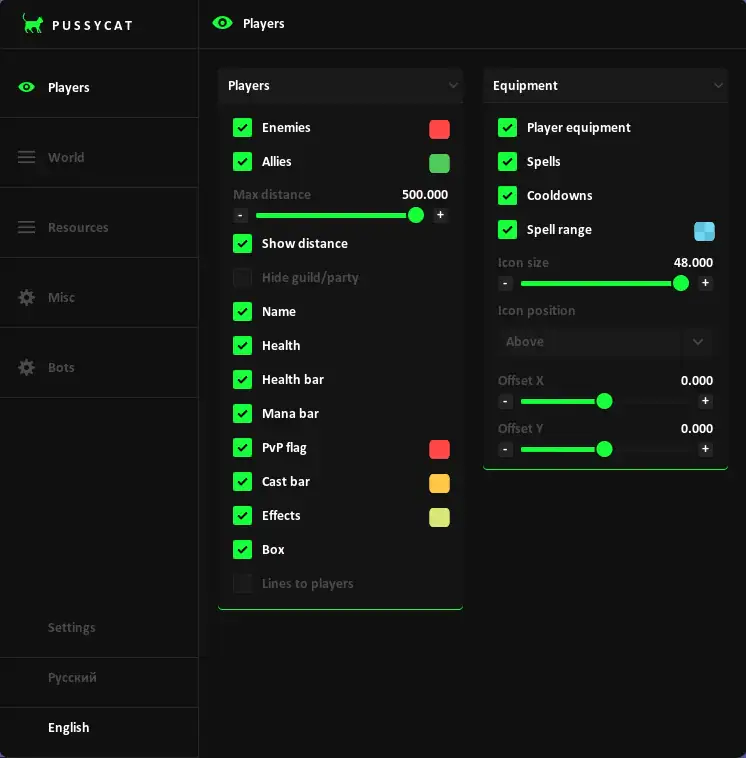
Player ESP displays Enemies and Allies with Name, Health, Mana Bar, PvP Flag, Effects, Distance and Boxes. Player Equipment, Spells, Cooldowns and Spell Range can also be displayed.
World ESP includes Mobs, Dropped Loot, Fishing Spots, Silver, Corpses, Hunt Tracks, Crystal Bosses, Events, Hideouts, Orbs, Shrines and Mounts. Separate categories are available for Chests, Dungeons, Smugglers and Wisps with distance settings and additional filters.
Resource ESP supports Wood, Stone, Fiber, Hide and Ore. Users can configure Min and Max Tier, Enchantment levels, display distance, resource charges and filters for depleted nodes.
Pussycat also includes Radar, Camera Zoom and No Fog. Radar position, size, icons and display distance can be configured separately.
The Bots section includes Gatherer, Fisher and Hunter. Gatherer automates resource collection and routes, Fisher supports Auto-Cast, Auto-Hook and Auto-Pull, while Hunter provides automated hunting functionality. Each mode includes additional route, mount, mob-defense and condition settings.
Additional options include Combat Buttons, Font Settings, Overlay FPS control, Menu Key selection, Save/Load Config and both English and Russian interfaces.
Buy private Pussycat cheat for Albion Online at. Check the current product status, system requirements and instructions before use.
Players
Players
• Enemies
• Allies
• Max Distance
• Show Distance
• Hide Guild / Party
• Name
• Health
• Health Bar
• Mana Bar
• PvP Flag
• Cast Bar
• Effects
• Box
• Lines to Players
• Line Origin - Bottom to Enemy, Top to Enemy, Crosshair to Enemy
Equipment
• Player Equipment
• Spells
• Cooldowns
• Spell Range
• Icon Size
• Icon Position - Above, Below Bars, Below Box
• Offset X
• Offset Y
World
Mobs
• Mobs
• Max Distance
• Hide Critters
• Aggro Radius
Dropped Loot
• Dropped Loot
• Max Distance
• Show Name
• Show Distance
Fishing
• Fishing Spots
• Max Distance
• Show Distance
• Hide Empty
Silver / Corpses
• Silver
• Silver Distance
• Silver Distance Label
• Corpses
• Corpse Distance
• Corpse Distance Label
Hunt Tracks
• Hunt Tracks
• Max Distance
• Show Distance
• Hide Used
Crystal Bosses
• Crystal Bosses
• Max Distance
• Show Distance
• Show Tier
Events
• Events
• Max Distance
• Show Distance
Hideouts / Orbs
• Hideouts
• Hideout Distance
• Show Distance
• Orbs
• Orb Distance
• Orb Distance Label
Shrines / Mounts
• Shrines
• Shrine Distance
• Shrine Distance Label
• Mounts
• Mount Distance
• Mount Distance Label
Chests
Loot Chests
• Loot Chests
• Max Distance
• Show Name
• Show Distance
• Show Rarity
• Hide Empty
Chest Mobs
• Chest Mobs
• Show Distance
Dungeons
• Enable
• Max Distance
• Show Distance
• Random
• Royal
• Randomized Holes
• Solo
• Veteran
• Elite
• Hide Visited
• Corrupted
• Hellgates
• Mists
Smugglers
• Crates
• Cages
• Max Distance
• Crate Distance
• Cage Distance
• Hide Opened
Wisps
• Wisps
• Max Distance
• Show Distance
• Filter - All, Solo, Duo, Group
Resources
Wood
• Nodes + Mobs
• Min Tier
• Max Tier
• Min Enchant
• Max Enchant
• Tier + Enchant on Label
• Max Distance
• Show Distance
• Show Charges
• Hide Depleted
• Show Resource Mobs
Stone
• Nodes + Mobs
• Min Tier
• Max Tier
• Min Enchant
• Max Enchant
• Tier + Enchant on Label
• Max Distance
• Show Distance
• Show Charges
• Hide Depleted
• Show Resource Mobs
Fiber
• Nodes + Mobs
• Min Tier
• Max Tier
• Min Enchant
• Max Enchant
• Tier + Enchant on Label
• Max Distance
• Show Distance
• Show Charges
• Hide Depleted
• Show Resource Mobs
Hide
• Corpses + Mobs
• Min Tier
• Max Tier
• Min Enchant
• Max Enchant
• Tier + Enchant on Label
• Max Distance
• Show Distance
• Show Charges
• Hide Depleted
• Show Mobs / Corpses
Ore
• Nodes + Mobs
• Min Tier
• Max Tier
• Min Enchant
• Max Enchant
• Tier + Enchant on Label
• Max Distance
• Show Distance
• Show Charges
• Hide Depleted
• Show Resource Mobs
Misc
Radar Settings
• Radar
• POS X
• POS Y
• Size
• Icons
• Distance
World / Visual
• Camera Zoom
• Zoom Distance
• No Fog
Debug Dump
• ESP Players
• ESP World
• ESP Resources
• ESP Portals
Bots
Gatherer
• Enable Auto Gather
• Gather Radius
• Filter Resources via ESP
• Skip Resources Behind Walls
• Mob Defense
• Skip Dangerous Mobs
• Min Mob Avoid
• Return to Route
• Block Stuck Resource
• Stuck Timeout
• Auto Food
• Stop on Overload
• Stop from Load %
• Use Mount for Gathering
• Show Gather Radius
• Load
Area & Route
• Draw Gather Area
• Cancel Area
• Clear Area
• Saved
• Save
• Load
• Remove
• Build Own Route
• Stop Route Recording
• Clear Route
• Saved
• Save
• Load
• Remove
Fisher
• Enable Fishing
• From Route Line
• Show Fishing Radius
• Priority Chest
• Empty Spots
• Use Mount
• Auto Food
• Auto Bait
• Mob Defense
• Auto-Cast
• Auto-Hook
• Auto-Pull
• Auto-Repeat
• Fish the Whole Spot
• Move to Next Spot
• Return to Route After Fishing
Area & Route
• Build Own Route
• Stop Route Recording
• Clear Route
• Saved
• Save
• Load
• Remove
Hunter
• Enable Hunt
• Hunt Radius
• Hunt Along Route
• Mob Defense
• Attack Aggro Mobs
• Escape Mode
• Run Below HP %
• Skip Mobs Behind Walls
• Auto Food
• Stop on Overload
• Stop from Load %
• Use Mount for Hunting
• Show Hunt Radius
• Load
Area & Route
• Draw Gather Area
• Cancel Area
• Clear Area
• Saved
• Save
• Load
• Remove
• Build Own Route
• Stop Route Recording
• Clear Route
• Saved
• Save
• Load
• Remove
Settings
Combat Buttons
• Ability 1
• Ability 2
• Ability 3
• Ability 4
• Ability 5
• Ability 6
Font Settings
• Enemy Font Size
• Item Font Size
Config
• Lock Overlay FPS
• Menu Key - INSERT, PageUP, PageDown, END, RShift
• Save Config
• Load Config
Language
• English
• Russian