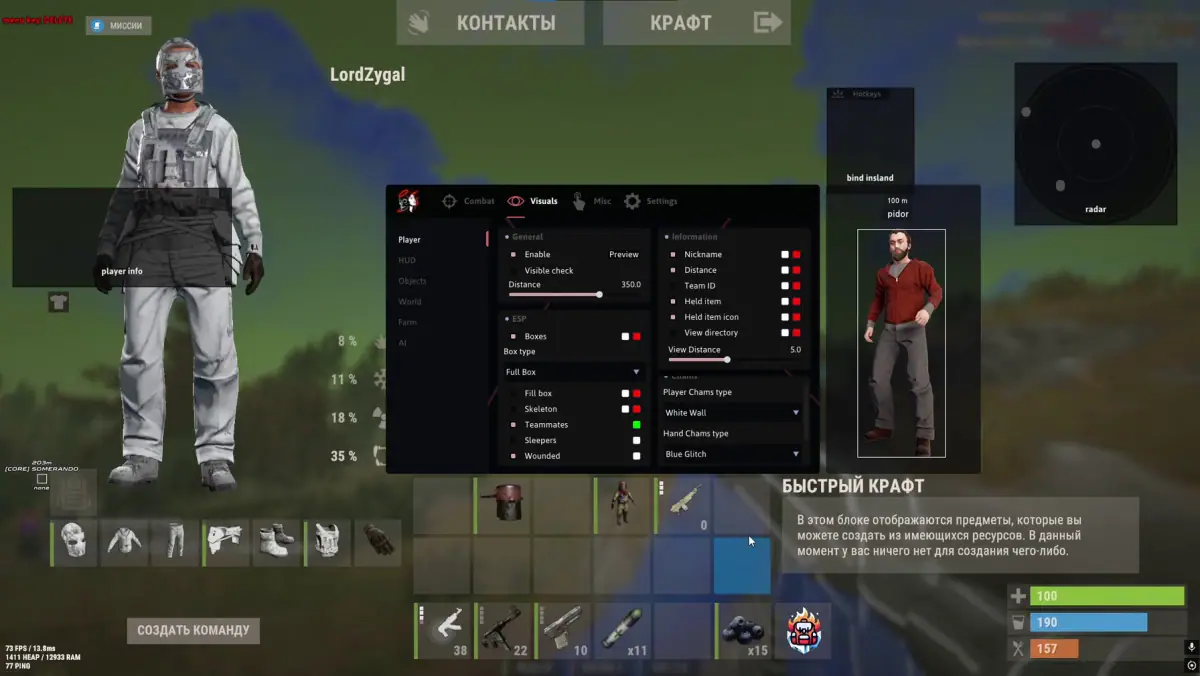
Welcome to the official page of Doza — a private cheat for Rust available on.
This tool is designed for players who want to dominate Rust servers and enjoy full control over the game.
Main features of Doza:
• Aimbot with smooth targeting, bone selection, and visibility checks
• ESP for players, loot, and resources to always know what’s around you
• Security options to stay undetected by anti-cheat
• High performance and stability, with no FPS drops
With Doza, you gain a significant advantage in every fight, ensuring precision, awareness, and reliability. Regular updates keep the cheat fully compatible with the latest Rust versions, making Doza one of the top solutions on the market.
Aimbot
• Enable
• Max distance
• Smoothness
• Silent Aimbot
• Visibility check
• Draw FOV
• Draw line to target
• Bone selection
• Hitbox override
Weapon
• No recoil
• No spread
• Fast bullet
• Desync
• Thick bullet
• Always shoot
• Insta-Eoka
• Insta-Bow
• Insta-Compound
Player Visuals
• Player ESP
• Max distance
• Preview mode
• Visibility check
• Boxes
• Skeleton
• Teammates
• Sleepers
• Wounded
• Weapon in hands
• Player names
• Distance
• Team ID
Chams
• Players
• Hands
• Weapons
HUD
• Target info
• Quick access panel
• Clothing
• Reload indicator
• Crosshair
• Off-screen arrows
• Radar
• Island marker
World Visuals
• Building: sleeping bags, cupboards, workbenches, distance
• Traps: auto turrets, SAM sites, flame turrets, mines, distance
• Loot: dropped items, corpses, backpacks, distance
• Vehicles: minicopters, scrap helis, bicycles, motorcycles, horses, boats, distance
• Raid: raid ESP, distance, timer
• Farming: sulfur, metal, stone, hemp, crates, distance
• AI: animals, scientists, Bradley, Chinook, patrol helicopter, distance
Misc
• Movement: infinite jump, spider climb, always sprint, flyhack, debug camera
• Gameplay: fast gather, suicide, no weapon animation, no weapon lowering, FOV changer, hand position, combat mode, third person, scale
• Visuals: bright environment, time changer, stars color, sky color, cloud color, remove layers
Settings
• Safe mode
• HUD preview
• ESP font
• Visibility check limit
• Create config
• Save
• Load
• Delete