UDP for WARDOGS is a private multifunctional cheat featuring Aimbot, advanced ESP, Radar and additional tools for providing information about the battlefield.
Aimbot supports selectable aim bones, adjustable FOV, Smooth and maximum distance. Target Prediction, Bullet Drop Compensation, Visible Check, Skip Teammates and Skip Downed options are also available.
Player ESP displays Names, Health, Weapons, Distance, Stance, Kills and Deaths, Skeleton and other information. Separate settings are available for enemies, teammates, downed and dead players, along with Off-Screen Arrows and Snaplines.
Vehicle ESP provides information about vehicles, distance, observed riders, damage sections, engine and altitude. World ESP covers Dropped Loot, Mines, C4 and Crates with configurable colors and display ranges.
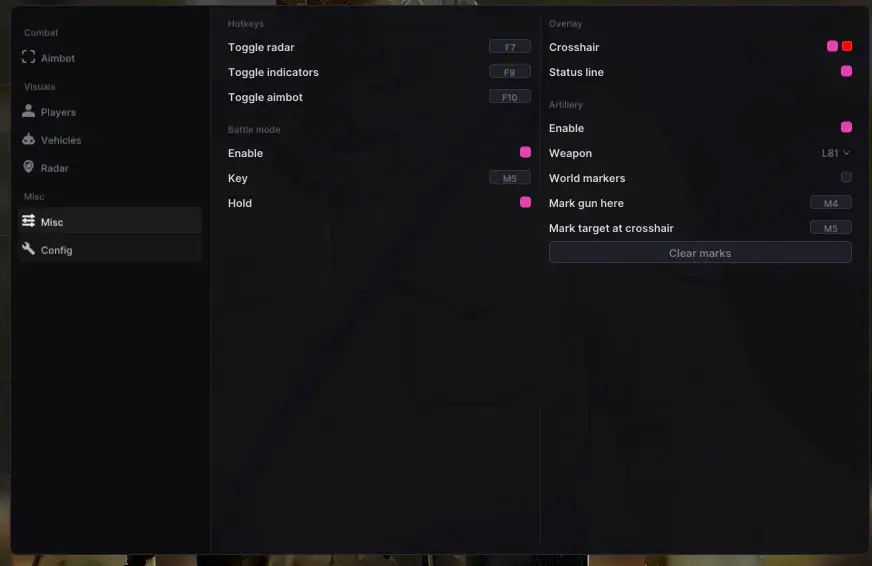
The built-in Radar supports Players, Vehicles, Names, Range Rings and adjustable size and range. Artillery tools allow users to mark a gun position and target using world markers.
Additional functionality includes Battle Mode, a customizable Crosshair, Hotkeys and a Staff Banner that identifies an Admin or Developer present in the match. Interface settings include menu scaling, English and Russian languages, Safe Mode and configuration management.
Buy private UDP cheat for WARDOGS at. Check the current product status, system requirements and instructions before use.
Aimbot
• Aim On / Off
• Aim Key
• Bone - Head / Neck / Chest / Pelvis / Nearest
• FOV - 10-600 px
• Smooth - 1-30
• Max Distance - 10-800 m
• Prediction / Target Lead
• Bullet Drop Compensation
• Skip Teammates
• Skip Downed
• Only Visible
• Draw FOV Circle
• FOV Circle Colour
• Target Line
• Target Line Colour
Player ESP
• Enable
• Box - Corners / Full / Off
• Box Fill
• Fill Alpha
• Name
• Health Bar
• Health Number
• Bar Side - Left / Right / Top / Bottom
• Smooth Bar
• Thinner with Range
• Distance
• Weapon
• Stance
• Kills / Deaths
• Skeleton
• Head Circle
• Skeleton Range - 10-1000 m
• Max Distance - 10-10000 m
• Hide Teammates
• Show Downed
• Downed Colour
• DOWNED Label
• Show Dead
• Dead Colour
• Enemy Colour
• Friendly Colour
• Unknown Team Colour
• Skeleton Colour
• Snapline Colour
• Indicator Colour
• Off-Screen Arrows
• Off-Screen Arrow Colour
• Indicator Range - 5-10000 m
• Fade with Distance
• Ring on Aim FOV
• Snaplines
• Snapline Colour
• Snapline Range - 5-10000 m
Visibility
• Visible Check On / Off
• Separate Visible Colours
• Separate Behind Cover Colours
• Separate Colours per Relation
Vehicles
• Enable
• Distance
• Observed Riders
• Box
• Damage Sections
• Engine
• Altitude
• Max Distance - 50-10000 m
• Enemy Colour
• Friendly Colour
• Unknown Team Colour
World
• Dropped Loot
• Loot Colour
• Loot Names
• Loot Range - 5-1000 m
• Mines / C4
• Mines / C4 Colour
• Danger Range - 5-1000 m
• Crates
• Crate Colour
• Crate Range - 5-1000 m
Radar
• Enable
• Heading Up
• Names
• Vehicles
• Range Rings
• Size - 120-500 px
• Range - 25-2000 m
• Background - 0-100%
• Draggable
Artillery
• Enable
• Weapon - Two Guns
• World Markers
• Mark Gun Here - Key
• Mark Target at Crosshair - Key
• Clear Marks
Battle Mode
• Enable
• Key
• Hold / Toggle
Overlay
• Crosshair
• Crosshair Colour
• Crosshair Shape - Cross / Circle / Dot
• Crosshair Size - 1-40 px
• Hide Crosshair While Aiming
• Status Line
• Staff Banner
• Admin or Developer in the Match - Named
Hotkeys
• Toggle Radar
• Toggle Indicators
• Toggle Aimbot
Misc / Config
• Menu Scale - 75-200%
• Language - English / Russian
• Accent Colour
• Safe Mode
• Save Config
• Reload Config
• Status Readout