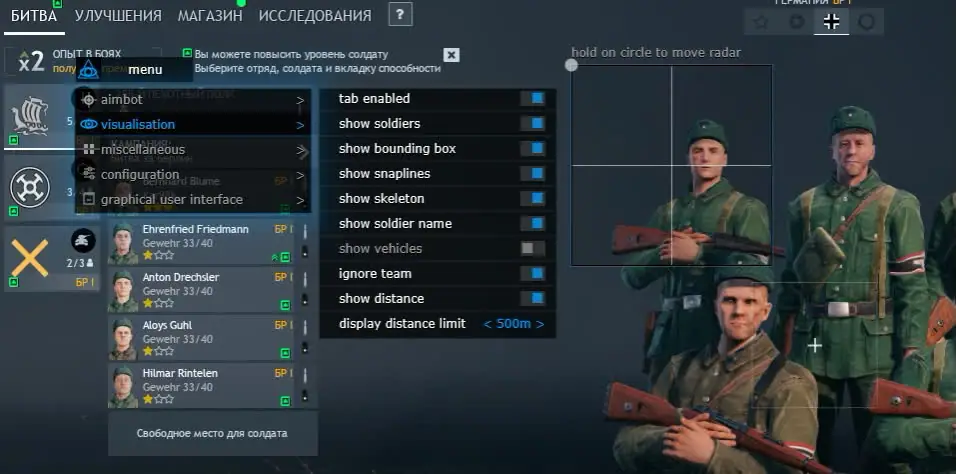
Mason Full for Enlisted is a complete cheat solution that combines an advanced aimbot, ESP system and additional visual tools to provide maximum battlefield awareness. It is designed for players who want a full-featured Enlisted cheat with extensive customization options.
The integrated Aimbot includes adjustable activation keys, aim radius, smoothing and aim speed settings. These options allow users to fine-tune target acquisition and adapt the cheat to their preferred playstyle.
The ESP system displays players, boxes, skeletons, player names, distances and snaplines. Vehicle ESP and configurable render distances provide additional information about the surrounding environment, helping players identify threats and opportunities more efficiently.
Mason Full also features a built-in radar system for enhanced map awareness. Adjustable radar size and detection radius make it easier to monitor enemy positions and maintain control over important areas of the battlefield.
If you are looking to buy an Enlisted cheat with Aimbot, ESP, Skeleton, Radar, Vehicle ESP and advanced configuration options, Mason Full is available on with regular updates, active support and current product status information.
Aimbot
• Enable
• Invert Aim Pitch
• Aim Key
• Aim Smooth
• Aim Radius
• Aim Step
Visuals
• ESP
• Players
• Boxes
• Player Names
• Skeletons
• Snaplines
• Distance
• Vehicles
• Ignore Team
• Player Distance Limit
• Vehicle Distance Limit
Settings
• CPU Saver
• Menu Key
• Panic Key
• Load Config From Clipboard
• Save Config To Clipboard
Interface
• Show Aim Radius
• Custom Crosshair
• Radar
• Radar Size
• Radar Radius