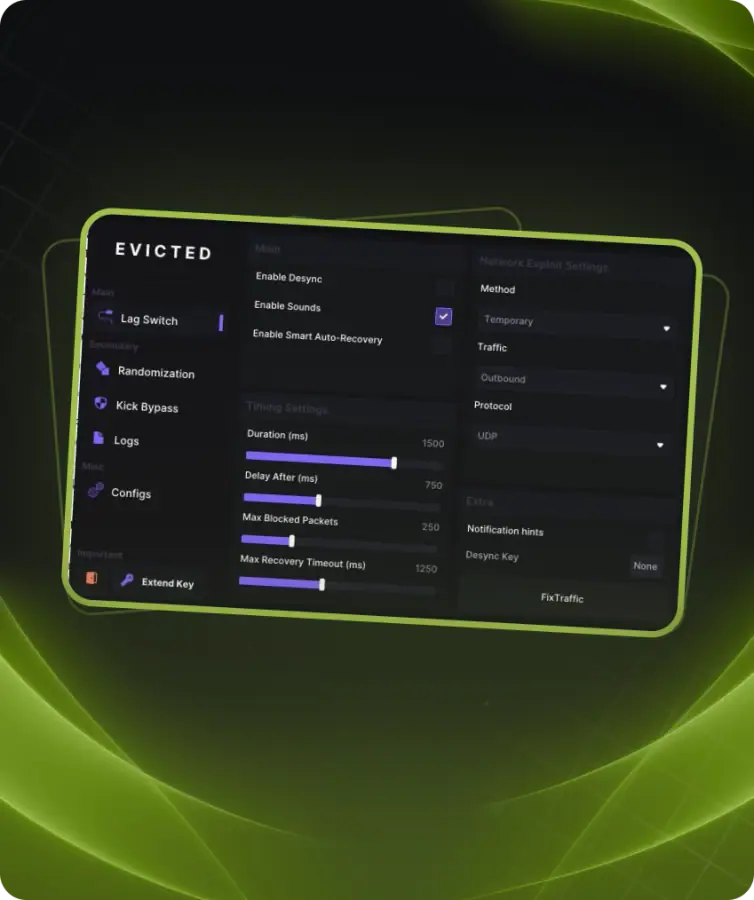
LagSwitch is a tool for Escape from Tarkov that lets you take control of your connection and create artificial delays. While it’s active, your character appears frozen to enemies, giving you extra time to shoot or check surroundings.
The main use cases are simple: freeze an enemy model to land a clean shot, or trigger lag to peek into a room and safely snap back. To others it looks like normal network delay, keeping the risk very low.
The software is stable, external, and completely safe for your PC.
Enable Desync
• Main toggle for enabling lag creation
Sounds
• Enable sound signals when lag starts or stops
Keybind
• Key used to toggle lag mode on or off
Method
• Temporary — lag starts for a set duration
• Pressing — toggles lag on/off with each press
• Hold — lag stays active while holding the key
Traffic Direction
• Outbound — blocks data you send (you freeze for others)
• Inbound — blocks data you receive (others freeze for you)
Protocol
• UDP — used by most online games
• TCP — less common for games
DurationMs
• How long each lag lasts in milliseconds
• DelayAfterMs
• Delay before you can activate lag again
KickBypass
• Bypass server kick with small intermittent lags
• DurationMs — time of each small lag
• DelayMs — delay between lags
• Iterations — number of small lags in a row
Randomizer
• Adds randomness to each lag duration
• RandomMin / RandomMax — range of added milliseconds
Logging
• Record all lag activation events for debugging
• AutoRecovery
• Auto-disable lag if it lasts too long or sends too many packets
• AutoRecoveryMaxTimeMs — max allowed duration
• AutoRecoveryMaxPackets — max allowed packets
Fake Lag
• Simulated packet drops for jitter effect
• Mode: Infinite or Timed
• BlockMin / BlockMax — length of each lag burst
• PauseMin / PauseMax — delay between bursts
• TotalDuration — how long Fake Lag lasts in Timed mode
• FakeLagKeybind — key to toggle Fake Lag