System Requirements
APEX 715 TEAM
Undetected




Features
AIMBOT
SETTINGS
LOOT
Choose a plan
RegionWORLD
Selected plan: 1 Day
$7.00
Secure payment, no fees
Description
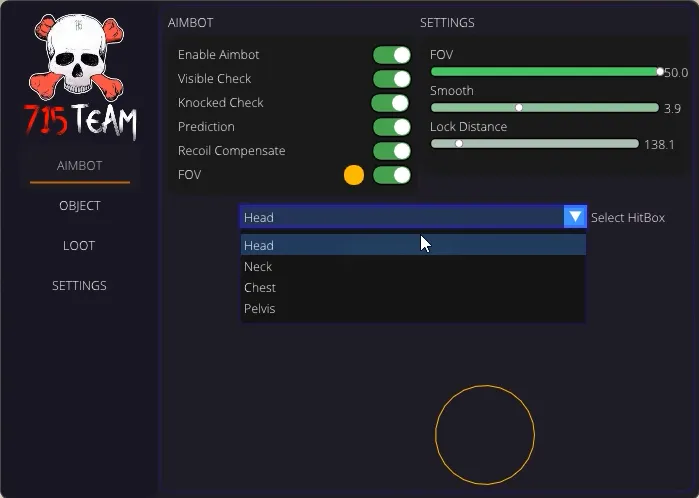
AimBot
1. Enable AimBot - enable automatic targeting of players
2. Visible Check - enable player visibility check before aiming
3. Knocked Check - enable check for downed players before aiming
4. Prediction - turn on pre-emption
5. Recoil Compensate - enable recoil compensation
6. FOV - enable FOV display/Adjust FOV color
============SETTINGS============
1. FOV - adjust FOV radius
2. Smooth - adjust the smoothness of the aiming
3. Lock Distance - set the distance for the aimbot to trigger on the player
4. Select HitBox[HEAD, NECK, CHEST, PELVIS] - set the bone to which the targeting will be made [HEAD, NECK, TORSO, PELVIS]
Object
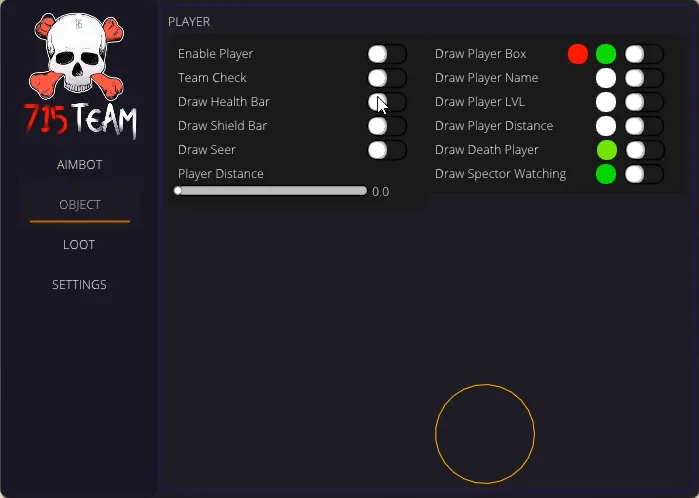
============Player============
1. Enable Player - enable display of players
2. Team Check - enable team check. When the check is enabled, your teammates will not be displayed
3. Draw Health Bar - enable display of progress bar with health
4. Draw Shield Bar - enable display of armor progress bar
5. Draw Seer - enable display of game progress bar of armor and health
6. Draw Player Box - enable display of box on players/Customize box color for visible and invisible player
7. Draw Player Name - enable display of players' nicknames
8. Draw Player LVL - enable display of player's game level
9. Draw Player Distance - enable display of distance to player
10. Draw Death - enable display of dead players/Customize color of dead players
11. Draw Spector Warning - enable display of warning that you are being watched/Customize warning color
12. Player Distance - adjust the distance to the displayed player
Loot - лут
1. Enable Loot - enable loot display
2. Draw Info - enable display of loot information
3. Loot Distance - adjust distance to displayed loot
============Filter loot============
1. Assault Rifles - enable display of automatic rifles/Customize text color of automatic rifles
2. Shotguns - enable shotgun display/Customize shotgun text color
3. Snipers - enable sniper rifle display/Customize sniper rifle text color
4. SMGS - enable display of submachine guns/Customize submachine gun text color
5. LMGS - enable display of light machine guns/Customize text color of light machine guns
6. Marksman - enable display of semi-automatic rifles/Customize text color of semi-automatic rifles
7. Pistols - enable display of pistols/Customize pistol text color
8. Ammo - enable ammo display/Customize ammo text color
9. Mags - enable display of stores/Customize text color of stores
10. Optics - enable sight display/Customize sight text color
11. Heal - enable display of health restoring items/Customize text color of health restoring items
12. Shield Battery - enable display of batteries for shield/Customize color of batteries for shield
13. Helmets - enable helmet display/Customize helmet text color
15. Bodys - enable display of body armor/Customize body armor text color
16. Shields - enable display of knockdown shields/Customize text color of knockdown shields
17. Backpacks - enable backpack display/Customize backpack text color
18. Knifes - enable display of throwing knives/Customize text color of throwing knives
19. Grenades - enable display of grenades/Customize grenades text color
20. Barrel - Enable display of attachments that increase the accuracy of many weapons/Customize text color of attachments that increase the accuracy of many weapons
21. Sights - enable display of laser sights/Customize laser sights text color
22. Bolt - enable shotgun bolt display/customize shotgun bolt text color
23. Stocks - enable display of attachments that improve weapon reload speed/Customize text color of attachments that improve weapon reload speed
24. Hop-Up - enable display of special attachments on weapons that significantly affect its characteristics/Customize the text color of special attachments on weapons that significantly affect its characteristics
25. Survival Items - enable display of survival items/Customize text color of survival items
26. Evo Points - enable display of promotion points/Customize promotion points text color
Settings
1. Tick Player Info - adjust the text size of the displayed information for players
2. Tick Player Box - adjust the thickness of the box for players
3. Tick Loot Info - adjust text size of displayed loot information